
Send documents from your phone, choose the print settings and nearby shop, review the total, pay, and follow the order until it is ready.
No subscription. Shop-specific pricing shown before payment. Pickup and delivery options depend on the selected shop.
How it works
- 01
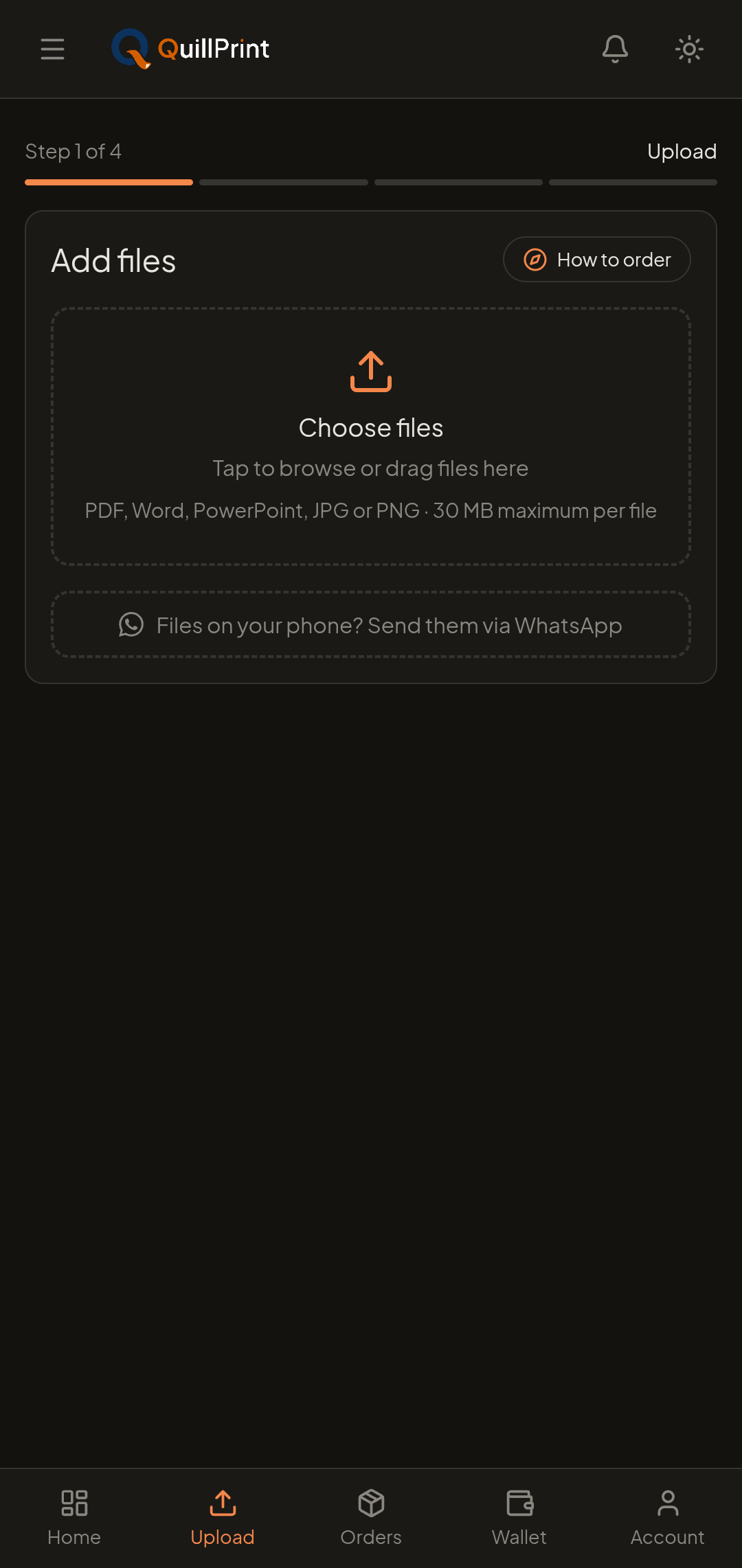
Send your document
Upload from your phone, tablet or computer, or send the file through WhatsApp and carry on from there.
PDF, DOC, DOCX, PPT, PPTX and more, up to 30 MB per document.
- 02
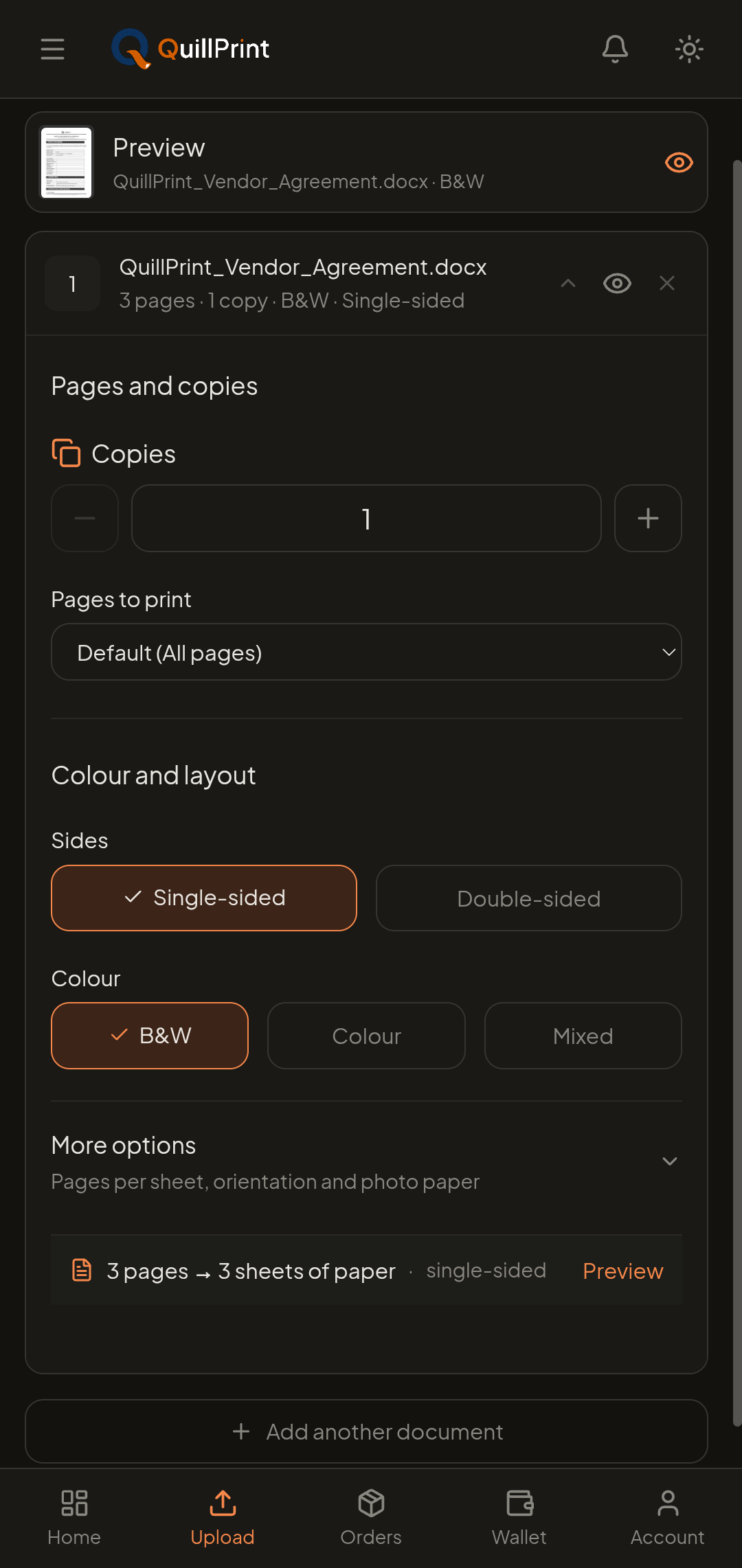
Choose your print settings
Set pages, copies, colour and sides. Layout and finishing options stay available when you need them.
Add several documents to one order and configure each separately.
- 03
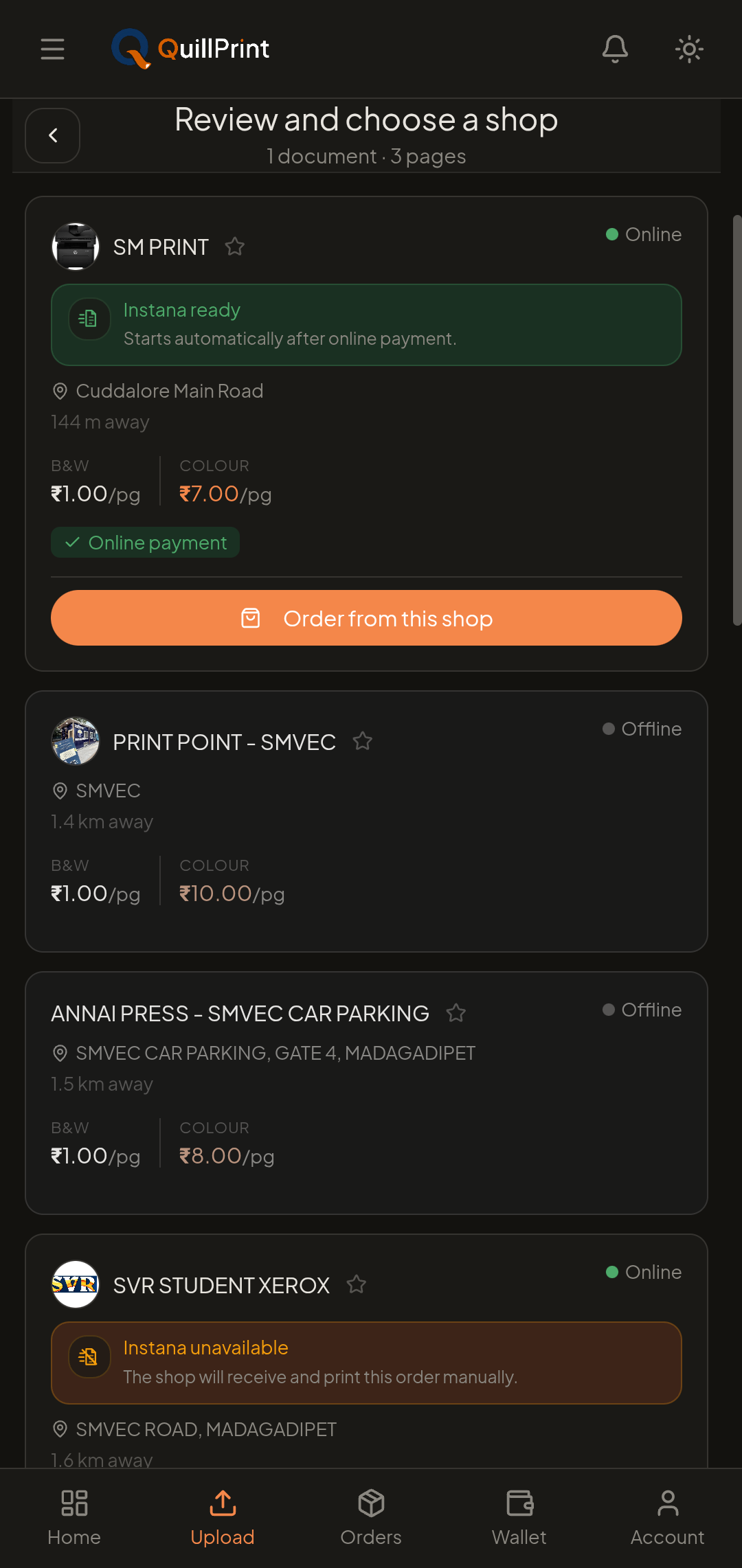
Compare nearby shops
Review available shops, their rates, services, Instana state and estimated ready time before you commit.
Every shop sets its own rates, so the total is shown for the shop you pick.
- 04
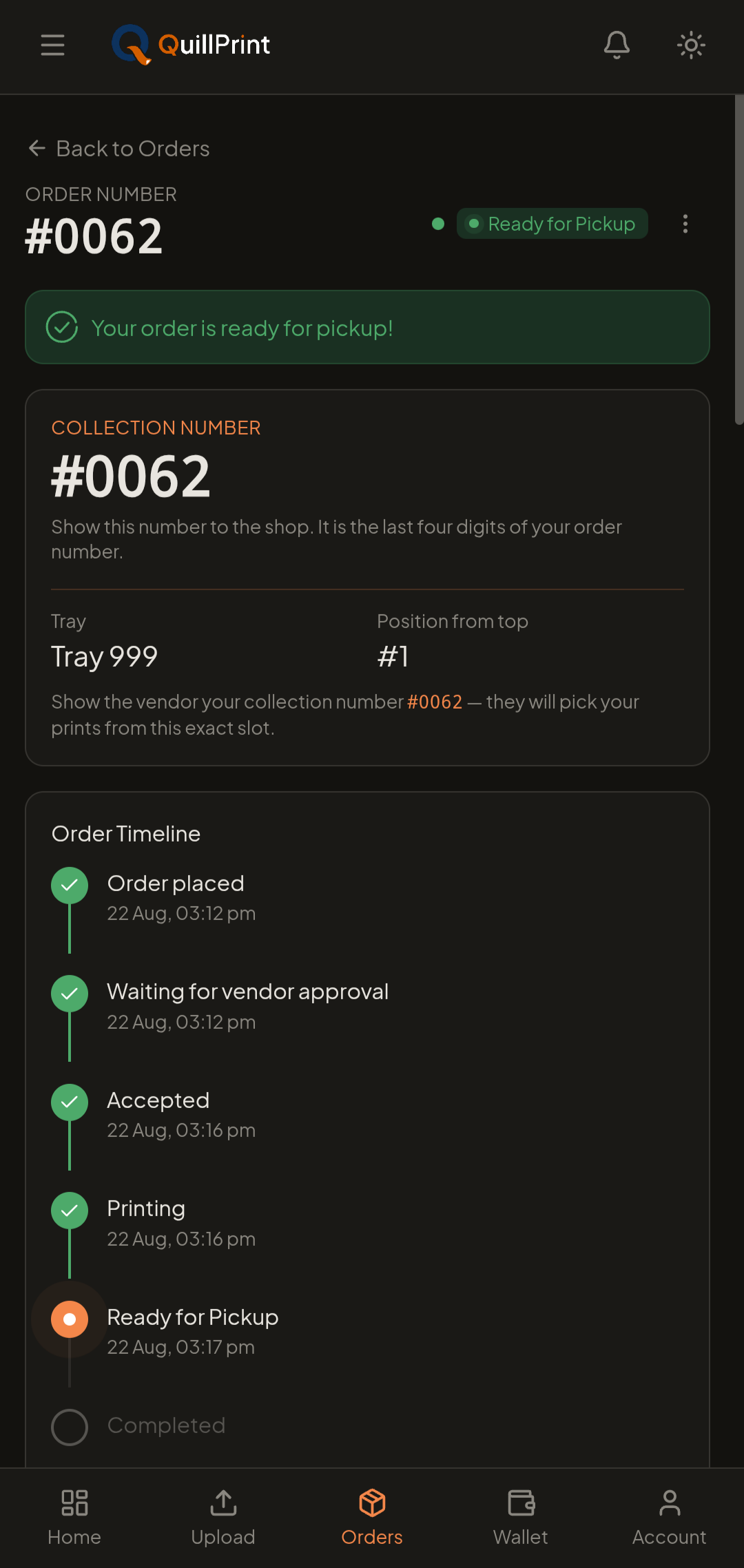
Pay, track and collect
Pay securely online or with Wallet, follow the order status, then collect with your four-digit collection number.
Delivery is available when the selected shop serves your location.
When the shop is free, eligible Instana orders can be ready in under a minute. If another job is already printing, QuillPrint shows the current estimated ready time.
Ready time when shop is free
Zero counter delay after pay
Real-time ETA shown live
Binding and other finishing may take additional time. If Instana is unavailable, the shop can still prepare the order normally.
What you will see on a shop
Interactive previewCampus Copy Centre
OpenNear Gate 2, Kalapet•4.9(180+)
Direct automated print run
0 jobs ahead in queue
What this means: The shop is free. An eligible paid order starts printing automatically.
Features
Six things QuillPrint handles for you, from the file on your phone to the prints in your hand.
Upload or WhatsApp documents
Send PDFs, Word files, presentations and images from your phone or computer, up to 30 MB per document, or forward what is already in WhatsApp.
Learn morePreview and choose exact pages
Check the document and the pages you selected before placing the order, so you catch the wrong file or page range early.
Compare nearby print shops
Review shops by location, rates, services, ratings and estimated ready time, then choose the one that fits your order.
Review shop-specific pricing
Each shop sets its own rates. Configure the document, compare shops, and review the complete order total before paying.
Learn morePay online or with Wallet
Pay securely online or use your QuillPrint Wallet. Pay at shop is available when that shop enables it.
Track and collect with a four-digit number
Follow the order from confirmation to collection, then show the large four-digit collection number at the shop.
Print choices
Choose only the settings you need. Copies, pages, colour and sides stay simple, while layout and finishing options remain available when required.
Colour, black & white, or selected pages
Print everything in colour, everything in black and white, or mark only the pages that need colour.
Single-sided or double-sided
Choose sides, and set auto, long-edge or short-edge binding direction for double-sided printing.
Exact pages and copy count
Print all pages, a range, or a specific selection, with a different copy count per document.
Pages per sheet and orientation
Fit multiple pages on one sheet and choose portrait or landscape where it applies.
Binding and finishing where offered
Binding, photo paper and other finishing appear when the shop you choose provides them.
Project-Report.pdf
Pages 1–4 of 38 shown
Page 1 · Colour
Page 2 · B & W
Page 3 · B & W
Page 4 · Colour
Preview the pages you selected before placing the order, so you can catch the wrong file or page range early.
Nearby shops
Every shop sets its own rates and its own services. Compare what matters for this particular job, price, distance, ready time, Instana state and how you will collect.
- Shop-specific black-and-white and colour rates
- Open, online or unavailable state
- Estimated ready time for your order
- Instana availability at that shop
- Pickup, and delivery where the shop serves your location
- Ratings from verified customer reviews
Campus Copy Centre
Kalapet, Puducherry
Black & white
₹2
per page
Colour
₹9
per page
Estimated ready
~5 min
for this order
Collection
Pickup
delivery not offered
Rates, services, Instana availability and ready time are set by each shop, so what you see changes with the shop you select. Your complete order total appears before payment.
Group Orders
Create a Group Order for a class, project team, or organisation. Share the link, collect the required documents, keep print rules consistent, and coordinate one shop and collection.
Group modes differ. The document and payment rules for the mode you choose are explained when you create the room.
Shared and individual documents
Add one shared document, individual member documents, or both, depending on the group mode you choose.
Common print settings
Set the print rules once so every member’s copy comes out consistent.
Member payment where supported
Each member can review their share and pay for their own document when the selected mode supports it.
Shared deadline
Set a deadline so everyone adds their document before the batch is sent.
Coordinated collection
The completed batch goes to one shop, so the group collects together.
Who it is for
For students
- Assignments and notes
- Lab records and manuals
- Projects and theses
- Class and group printing
For professionals
- Resumes and applications
- Reports and presentations
- Forms, contracts and office documents
- Repeat print orders
Payment to collection
The part after you pay is where most printing goes quiet. QuillPrint keeps it visible.
Wallet speeds up repeat checkout
Keep a QuillPrint Wallet balance and apply it directly at checkout, in full or in part. Eligible refunds are returned according to the displayed refund method.
Order state and ready time stay visible
Follow the order from confirmation to collection, with the current status and estimated ready time in front of you, no phone call to the shop.
A dropped connection does not lose your work
If the connection drops, QuillPrint keeps your print setup whenever possible so you can retry the upload or preview instead of rebuilding the order.
A large collection number makes pickup simple
When the order is ready, show the large four-digit collection number at the shop and collect your prints.
For print shops
Apply to become a QuillPrint partner, publish the services you offer, receive nearby online orders, manage order progress, and review your earnings from one partner experience.
Nearby customer visibility
Once approved, your shop appears to customers looking for printing near you.
Shop-controlled services, rates and availability
You publish the services you provide, set your own rates, and control when the shop is available.
Online order management
Receive online orders with the customer’s print requirements already set, then update progress and collection readiness.
Instana for eligible supported printing
Eligible paid orders can start printing automatically through Instana, reducing file handling and counter waiting at supported shops.
Earnings and settlement history
Review completed-order earnings, along with order and payment information, from the partner dashboard.
Where QuillPrint is available, and what you can print
QuillPrint lets you upload documents, choose your print settings, compare nearby print shops, pay, and then collect or receive your prints, with the price shown before you pay and order updates along the way.
You can send PDF, DOC and DOCX, PPT and PPTX, JPG and JPEG, and PNG files, up to 30 MB per document. You can add several documents to one order and configure each of them separately.
Yes. If the file is already in WhatsApp, send it to QuillPrint, then review your print settings, choose a shop and place the order from your phone.
Instana is QuillPrint's instant-printing service. At an Instana-enabled shop, an eligible paid order starts printing automatically. When the shop is free, eligible Instana orders can be ready in under a minute. If another job is already printing, QuillPrint shows the current estimated ready time.
No. Instana is available only at supported shops, and only eligible jobs start automatically. You can still place the order. The shop will prepare it normally, or you can choose another Instana shop if speed matters.
Every shop sets its own rates. Your total depends on the shop you choose, colour or black-and-white pages, single- or double-sided printing, paper size, copies, pages per sheet, and any binding or add-ons. Pickup or delivery charges apply where relevant. The complete total for the selected shop is shown before payment.
No. Pickup is the default way to collect. Delivery is offered only by participating shops and only for the locations they serve, so you will see it as an option when the shop you choose supports your location.
Group Orders let a class, project team or organisation print through one shared link. Members add their documents, the print rules stay consistent, payment follows the selected group mode, and the batch goes to one shop for coordinated collection.
Yes. QuillPrint works from your phone browser and can be added to your home screen, but a network connection is required for ordering and tracking. If the connection drops, QuillPrint keeps your print setup whenever possible so you can continue instead of starting again.
Files you upload are stored securely and used solely to fulfil your order. They are not sold, and they are not retained beyond 24 hours after the order is completed. Full detail is in the Privacy Policy.
No subscription. Review the selected shop's total before payment.